


Vocabulary memorization, retrieval and consistent practice in diverse and meaningful ways are essential for language development and progress. Today we will look at a very practical way to create flashcards to study, memorize and revisit vocabulary using ChatGPT in combination with other digital tools.
Imagine our Upper-Intermediate students have been learning and practicing vocabulary related to relationships, and they want to create vocabulary cards for that specific lexical set or add cards to an existing set they already have.
These are the lexical items:
– To click with someone
– A rocky marriage
– To cut ties with someone
– To bond with someone
– To be on good/bad terms with someone
– To see eye to eye on things
– To fall out with someone
– To get on like a house on fire
– To hit it off
– To pop the question
– To drift apart
– To dump someone
All we have to do is give ChatGPT (or similar Gen.AI) the following prompt: Create a table with example sentences using the following lexical items related to relationships. On the right side, include the sentences in English. On the left side, provide their Spanish translations. Please use bold letters to highlight the focal vocabulary in both English and Spanish. I am an Upper-Intermediate student of English so the sentences should clearly exemplify the meaning of each lexical item. These are the lexical items (list of items above).
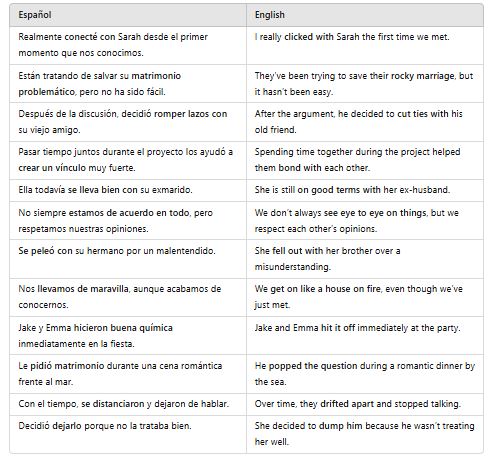
– Realmente conecté con Sarah desde el primer momento que nos conocimos. (I really clicked with Sarah the first time we met.)
– Están tratando de salvar su matrimonio problemático, pero no ha sido fácil. (They’ve been trying to save their rocky marriage, but it hasn’t been easy.)
– Después de la discusión, decidió romper lazos con su viejo amigo. (After the argument, he decided to cut ties with his old friend.)
– Pasar tiempo juntos durante el proyecto los ayudó a crear un vínculo muy fuerte. (Spending time together during the project helped them bond with each other.)
– Ella todavía se lleva bien con su exmarido. (She is still on good terms with her ex-husband.)
– No siempre estamos de acuerdo en todo, pero respetamos nuestras opiniones. (We don’t always see eye to eye on things, but we respect each other’s opinions.)
– Se peleó con su hermano por un malentendido. (She fell out with her brother over a misunderstanding.)
– Nos llevamos de maravilla, aunque acabamos de conocernos. (We get on like a house on fire, even though we’ve just met.)
– Jake y Emma hicieron buena química inmediatamente en la fiesta. (Jake and Emma hit it off immediately at the party.)
– Le pidió matrimonio durante una cena romántica frente al mar. (He popped the question during a romantic dinner by the sea.)
– Con el tiempo, se distanciaron y dejaron de hablar. (Over time, they drifted apart and stopped talking.)
– Decidió dejarlo porque no la trataba bien. (She decided to dump him because he wasn’t treating her well.)
I cannot count the times I’ve told students to try to learn vocabulary in context. This could be from the source where the lexical item was encountered, from an example sentence in a dictionary, or, these days, from Gen.AI.
I am going to share with you the easiest way I know to create digital flashcards. It’s as follows: Use the mouse to select the sentences from your table in ChatGPT, right-click with the mouse, and select ‘copy’. Next, we are going to create flashcards with a free web-based tool. There are a handful of them: Quizlet, Flippity, Anki or Cram are popular ones. For Cram (and this would be pretty much the same for any other tool), log in if you have an account, or log in with a Google, Facebook or Twitter account. Choose ‘create flashcards’, then click on ‘Import a flashcard set’ and paste the text from the ChatGPT table into the ‘Copy and paste your data’ box. Finally, click on ‘Create set’.
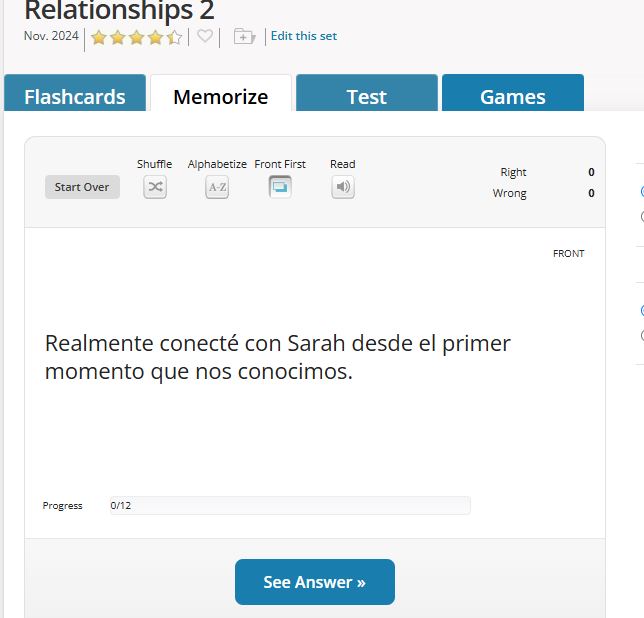
I noticed two interesting features: the flashcards can show both sides, which is optimal for getting to grips with the language at first or for reviewing, and the audio icon for a read-aloud version.
Students could create different sets according to lexical fields and also edit existing sets to add new cards. All they have to do is use ChatGPT to create a table with the new sentences and go through the same process again.
Last but not least, students can always create their own vocabulary cards using physical index cards copying down the generated sentences from ChatGPT.
 AI in ELT